 Above
Above
Look up. Know what’s there.
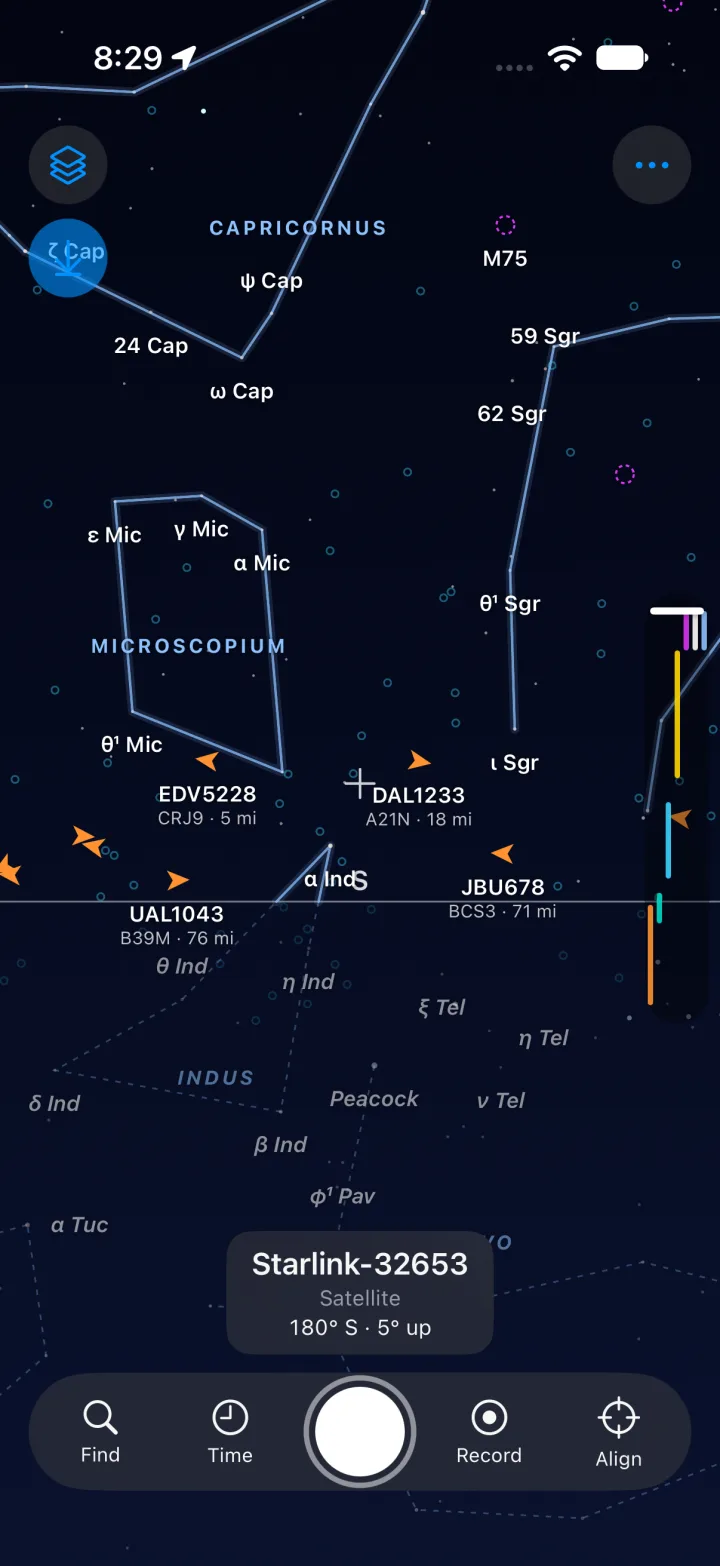
Point your iPhone at the sky and Above labels what you see on the camera view: the airliner crossing the Moon, the ISS, a Starlink train, Jupiter, a star 25 light-years away.
Coming soon to the App Store
What leaves your phone
iPhone, iOS 17 or later. Free, with an optional Above Plus subscription.
Overhead
An example evening. Not live data.
| Object | Kind | Bearing | Alt° | Distance | Status |
|---|---|---|---|---|---|
| ISS | Satellite | 232° southwest | 41° up | 612 km | bright pass |
| Jupiter | Planet | 118° east-southeast | 27° up | 4.9 astronomical units | rising |
| Moon | Moon | 205° south-southwest | 33° up | 384,000 km | waxing |
| UAL560 | Airliner | 292° west-northwest | 18° up | 31 km | in flight |
| Starlink | Satellite | 266° west | 22° up | 540 km | a train of 20 |
| Balloon | Balloon | 330° north-northwest | 61° up | 24 km | rising |
| Vega | Star | 315° northwest | 58° up | 25 light-years | visible |
| Sirius | Star | 158° south-southeast | 12° below the horizon | 8.6 light-years | below the horizon |
Every row is something Above labels on your camera view.
The board’s columns are the answers to the three questions you ask when you see a light.
- What is it?
- Airliners with their route and photo, the ISS and about 12,000 other satellites, the Moon, planets, comets, stars, constellations, weather balloons and drones that broadcast Remote ID.
- Where do I point?
- The bearing is the compass direction, clockwise from north. The altitude is how many degrees above the horizon. Above draws the label right there on the camera view, and an arrow leads you to anything you search for.
- How far away is it?
- From a drone down the street to a star beyond the scale. A slider on the edge of the screen filters the sky by distance, so a crowded view becomes one layer at a time.
- Aircraft
- Satellites
- Sun, Moon, planets
- Stars
- Deep sky
- Weather balloons
- Drones
- Constellations
Then find it, tap it, and learn what it was.
- Find anything
- Search for Jupiter or the ISS and an arrow leads you to it.
- Tap for details
- An aircraft’s route, type, altitude, speed and photo. A satellite’s owner and launch date. A star’s distance and constellation.
- What was that? Above Plus
- Rewind to when you saw a light, point where it was, and Above tells you whether it was a Starlink train, a plane or something else.
- Passes and alerts Above Plus
- Know when the ISS and bright satellites pass over you. Alerts are worked out on your phone.
- Transits Above Plus
- Find the moment a plane or the ISS crosses the Sun or the Moon, for photographers.
- Tonight
- Moon phase, cloud cover from Apple Weather, the aurora forecast, rocket launches and meteor showers, for where you are.
- See through the Earth
- One tap shows what is below the horizon, dimmed, like the last row above, so you can find where a planet will rise or where a satellite just set.
- Made for the dark
- A red-on-black night mode keeps your eyes adjusted, and widgets and Live Activities Above Plus keep the next pass on your lock screen.
Your sky stays yours.
- No account, no ads, no tracking.Above has no sign-in and no analytics.
- The camera view stays on your phone.It is never recorded or sent anywhere.
- Location is rounded first.A server hears roughly where you are, to about a kilometre, never exactly.
Coming to the iPhone.
Coming soon to the App StoreQuestions before then, or something to report? Write to us.